 Mattermost v11.0 is now available! Learn what's new »


Calls Deployment on Kubernetes
 Available on Entry, Professional, Enterprise, and Enterprise Advanced plans
This guide provides detailed information for deploying Mattermost Calls on Kubernetes environments.
Overview
Mattermost Calls has been designed to integrate well with Kubernetes to offer improved scalability and control over the deployment. For Kubernetes deployments, the RTCD service is strongly recommended and is the only officially supported approach.
Architecture
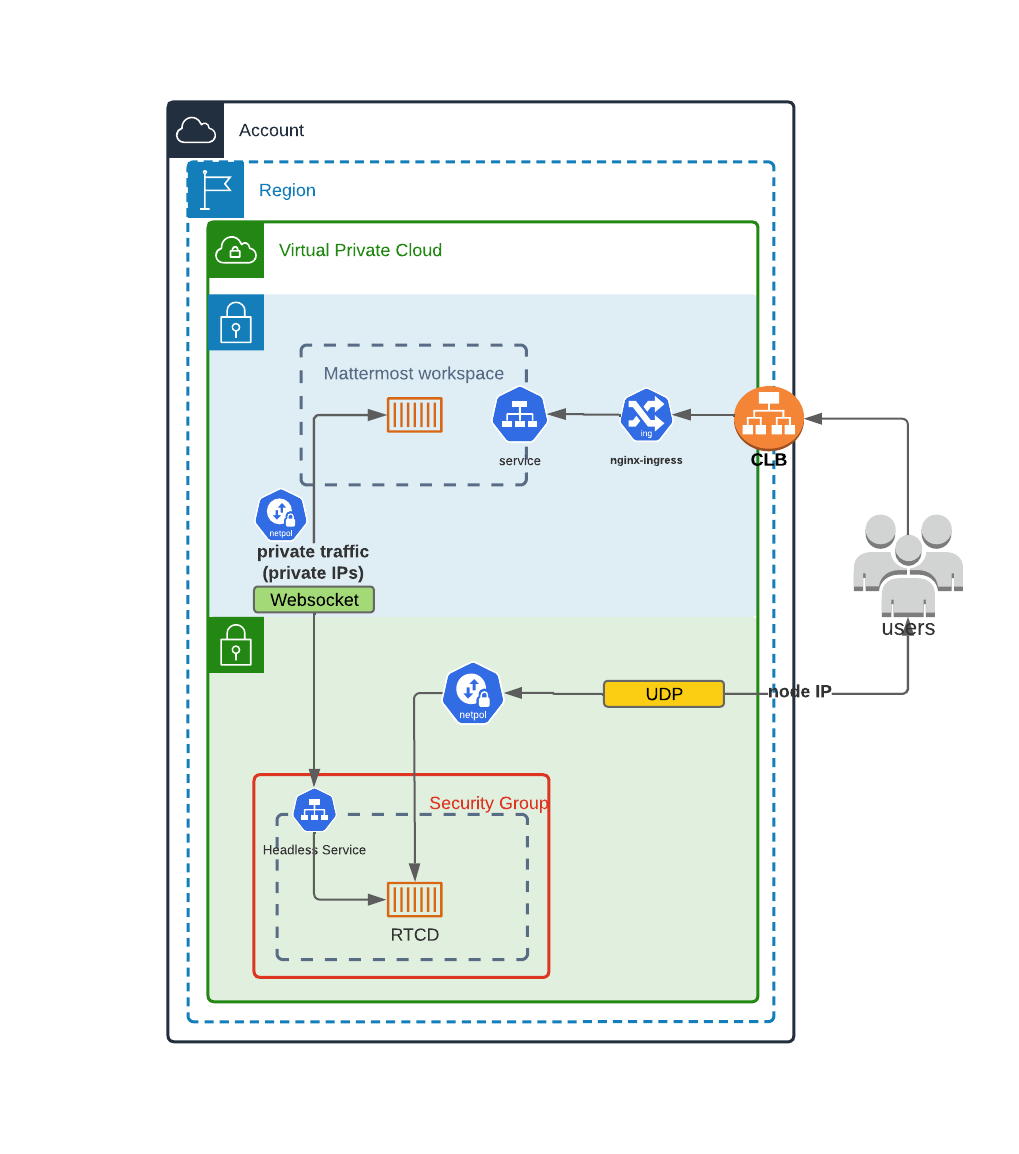
This diagram shows how the RTCD standalone service can be deployed in a Kubernetes cluster. In this architecture:
Calls traffic is handled by dedicated RTCD pods
Scaling is managed through Kubernetes deployment configurations
Call recording and transcription is handled by the calls-offloader service (see Calls Offloader Setup and Configuration)
If Mattermost isn’t already deployed in your Kubernetes cluster and you want to use this deployment type, visit the Kubernetes operator guide.
Helm Chart Deployment
The recommended way to deploy Calls-related components in a Kubernetes environment is to use the officially provided Helm charts:
RTCD Helm Chart
The RTCD Helm chart deploys the RTCD service needed for call media handling:
helm repo add mattermost https://helm.mattermost.com
helm repo update

helm install mattermost-rtcd mattermost/mattermost-rtcd \
  --set service.annotations."service\\.beta\\.kubernetes\\.io/aws-load-balancer-backend-protocol"=udp
For complete configuration options, see the RTCD Helm chart documentation.
Calls-Offloader Helm Chart
If you need call recording and transcription capabilities, deploy the calls-offloader service:
helm install mattermost-calls-offloader mattermost/mattermost-calls-offloader \
  --set ingress.enabled=true \
  --set ingress.host=calls-offloader.example.com
For complete configuration options, see the Calls-Offloader Helm chart documentation.
Kubernetes-Specific Configuration
Network Configuration
For Kubernetes deployments, you need to ensure specific connectivity paths:
Client to RTCD connectivity: UDP and TCP traffic on port 8443 is properly routed from clients to RTCD pods (for media, with TCP acting as a fallback).
Mattermost to RTCD API connectivity: There needs to be a clear connectivity path between Mattermost and RTCD on the API port (TCP 8045)
Network policies: Network policies must allow the required communications between Mattermost and RTCD services
Resource Requirements
Resource requirements for RTCD pods depend heavily on the expected call volume, participant count, and whether screen sharing is used.
We strongly recommend reviewing the Performance Baselines to determine the appropriate CPU, memory, and network requests and limits for your specific deployment needs rather than relying on generic defaults.
Scaling Considerations
Horizontal scaling of RTCD pods is possible, but remember:
Each call is hosted entirely on a single RTCD pod
DNS A records should be set up for all RTCD pods so server can discover RTCD servers.
Health checks should ensure that only healthy pods are reported via DNS
Calls remain on their assigned pod for their entire duration
Limitations
Due to the inherent complexities of hosting a WebRTC service, some limitations apply when deploying Calls in a Kubernetes environment.
One key requirement is that each rtcd process must live in a dedicated Kubernetes node. This is necessary to forward the data correctly while allowing for horizontal scaling. Data should generally direct directly to the pod running the rtcd process, as routing this traffic through a standard ingress is not recommended for RTCD deployments.
The general recommendation is to expose one external IP address per rtcd instance (Kubernetes node). This makes it simpler to scale as the application is able to detect its own external address (through STUN) and advertise it to clients to achieve connectivity with minimal configuration.
Monitoring and Metrics
For detailed information on metrics collection and monitoring, see the Calls Metrics and Monitoring guide.
Troubleshooting
For Kubernetes-specific troubleshooting:
Check pod logs:
kubectl logs -f deployment/mattermost-rtcdVerify service connectivity:
kubectl port-forward service/mattermost-rtcd 8045:8045Ensure UDP and TCP traffic is properly routed through your load balancer
Verify network policies allow required communication paths
For detailed troubleshooting steps, see the Calls Troubleshooting guide.
Other Calls Documentation
Calls Overview: Overview of deployment options and architecture
RTCD Setup and Configuration: Comprehensive guide for setting up the dedicated RTCD service
Calls Offloader Setup and Configuration: Setup guide for call recording and transcription
Calls Metrics and Monitoring: Guide to monitoring Calls performance using metrics and observability
Calls Troubleshooting: Detailed troubleshooting steps and debugging techniques
If you encounter issues, see Calls Troubleshooting