 Mattermost v11.0 is now available! Learn what's new »


Deploy Mattermost Calls
 Available on Entry, Professional, Enterprise, and Enterprise Advanced plans
This document provides an overview of Mattermost Calls deployment options for self-hosted environments, including air-gapped environments, ensuring private communication without reliance on public internet connectivity with flexible configuration options for complex network requirements.
Quick Links
For detailed information on specific topics, please refer to these specialized guides:
RTCD Setup and Configuration: Comprehensive guide for setting up the dedicated RTCD service
Calls Offloader Setup and Configuration: Comprehensive guide for setting up the calls-offloader service for recording and transcription
Calls Troubleshooting: Detailed troubleshooting steps and debugging techniques
Calls Metrics and Monitoring: Guide to monitoring Calls performance using metrics and observability
Calls Deployment on Kubernetes: Detailed guide for deploying Calls in Kubernetes environments
About Mattermost Calls
Mattermost Calls provides integrated audio calling and screen sharing capabilities within Mattermost channels. It’s built on WebRTC technology and can be deployed either:
Integrated mode: Built into the Calls plugin (simpler, suitable for smaller deployments)
RTCD mode: Using a dedicated service for improved performance and scalability (recommended for production environments)
Terminology
WebRTC: The set of protocols on which calls are built
RTC: Real-Time Connection channel used for media (audio/video/screen)
WS: WebSocket connection used for signaling and connection setup
SFU: Selective Forwarding Unit, routes media between participants
NAT: Network Address Translation for mapping IP addresses
STUN: Protocol used by WebRTC clients to help traverse NATs
TURN: Protocol to relay media for clients behind strict firewalls
Key Components
Calls plugin: The main plugin that enables calls functionality. Installed by default in Mattermost self-hosted deployments.
RTCD service: Optional dedicated service for offloading media processing (Enterprise feature). Typically deployed to dedicated servers or containers. See RTCD Setup and Configuration for details.
calls-offloader: Service for call recording and transcription (if enabled). Typically deployed to dedicated servers. See Calls Offloader Setup and Configuration for setup and troubleshooting details.
Network Requirements
Run Mattermost server on a secure (HTTPs) connection. This is a necessary requirement on the client to allow capturing devices (e.g., microphone, screen). See the config TLS section for more info.
See network requirements below.
Client
Clients need to be able to connect (send and receive data) to the instance hosting the calls through the UDP port configured as
RTC Server Port. If this is not possible a TURN server should be used to achieve connectivity.Depending on the platform or operating system, clients may need to grant additional permissions to the application (e.g., browser, desktop app) to allow them to capture audio inputs or share the screen.
Network
| Service | Ports | Protocols | Source | Target | Purpose |
|---|---|---|---|---|---|
| API (Calls plugin) | 80,443 | TCP (incoming) | Mattermost clients (web/desktop/mobile) | Mattermost instance (Calls plugin) | To allow for HTTP and WebSocket connectivity from clients to Calls plugin. This API is exposed on the same connection as Mattermost, so there's likely no need to change anything. |
RTC (Calls plugin or rtcd) |
8443 | UDP (incoming) | Mattermost clients (Web/Desktop/Mobile) and jobs spawned by Calls Offloader (Recorder, Transcriber) | Mattermost instance or rtcd service |
To allow clients to establish connections that transport calls related media (e.g. audio, video). This should be open on any network component (e.g. NAT, firewalls) in between the instance running the plugin (or rtcd) and the clients joining calls so that UDP traffic is correctly routed both ways (from/to clients). |
RTC (Calls plugin or rtcd) |
8443 | TCP (incoming) | Mattermost clients (Web/Desktop/Mobile) and jobs spawned by Calls Offloader (Recorder, Transcriber) | Mattermost instance or rtcd service |
To allow clients to establish connections that transport calls related media (e.g. audio, video). This should be open on any network component (e.g. NAT, firewalls) in between the instance running the plugin (or rtcd) and the clients joining calls so that TCP traffic is correctly routed both ways (from/to clients). This can be used as a backup channel in case clients are unable to connect using UDP. It requires rtcd version >= v0.11 and Calls version >= v0.17. |
API (rtcd) |
8045 | TCP (incoming) | Mattermost instance(s) (Calls plugin) | rtcd service |
To allow for HTTP/WebSocket connectivity from Calls plugin to rtcd service. Can be expose internally as the service only needs to be reachable by the instance(s) running the Mattermost server. |
STUN (Calls plugin or rtcd) |
3478 | UDP (outgoing) | Mattermost Instance(s) (Calls plugin) or rtcd service |
Configured STUN servers | (Optional) To allow for either Calls plugin or rtcd service to discover their instance public IP. Only needed if configuring STUN/TURN servers. This requirement does not apply when manually setting an IP or hostname through the ICE Host Override config option. |
For complete network requirements, see the RTCD Setup and Configuration guide.
RHEL deployments with firewalld and fapolicyd
When deploying Mattermost Calls or the rtcd service on RHEL systems with firewalld or fapolicyd enabled, additional firewall and security configuration is required.
Required ports:
Calls plugin (integrated): Port 8443 UDP/TCP for RTC media traffic
rtcd service (standalone): Ports 8443 UDP/TCP for RTC media traffic + Port 8045 TCP for API communication with Mattermost
Configuration steps:
For complete firewalld and fapolicyd configuration instructions, including troubleshooting steps and example rules, see the RHEL deployment guide. The guide includes:
firewalld port configuration for Mattermost, Calls plugin, and rtcd service
fapolicyd rules for Mattermost server and Calls plugin
Separate fapolicyd configuration for standalone rtcd service
Troubleshooting guidance for “operation not permitted” errors
Note
The Calls plugin runs as part of Mattermost and is covered by the standard Mattermost fapolicyd rules. Only the standalone rtcd service requires separate fapolicyd configuration.
Limitations
All Mattermost customers can start, join, and participate in 1:1 audio calls with optional screen sharing.
For group calls up to 50 concurrent users, Mattermost Enterprise, Professional, or Mattermost Cloud is required.
Enterprise customers can also record calls, enable live text captions during calls, and transcribe recorded calls. We recommend that Enterprise self-hosted customers looking for group calls beyond 50 concurrent users consider using the dedicated RTCD service.
For Mattermost self-hosted deployments, System admins need to enable and configure the plugin using the System Console. The default maximum number of participants is unlimited; however, we recommend a maximum of 50 participants per call. Maximum call participants is configurable by going to System Console > Plugin Management > Calls > Max call participants. Call participant limits greatly depends on instance resources. For more details, refer to the Performance Considerations section below.
Configuration
For Mattermost self-hosted customers, the calls plugin is pre-packaged, installed, and enabled. Configuration to allow end-users to use it can be found in System Console > Plugins > Calls.
Modes of operation
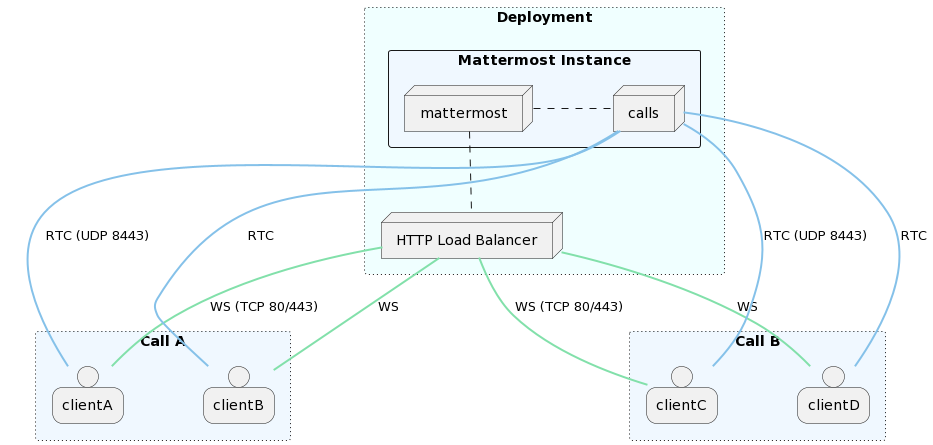
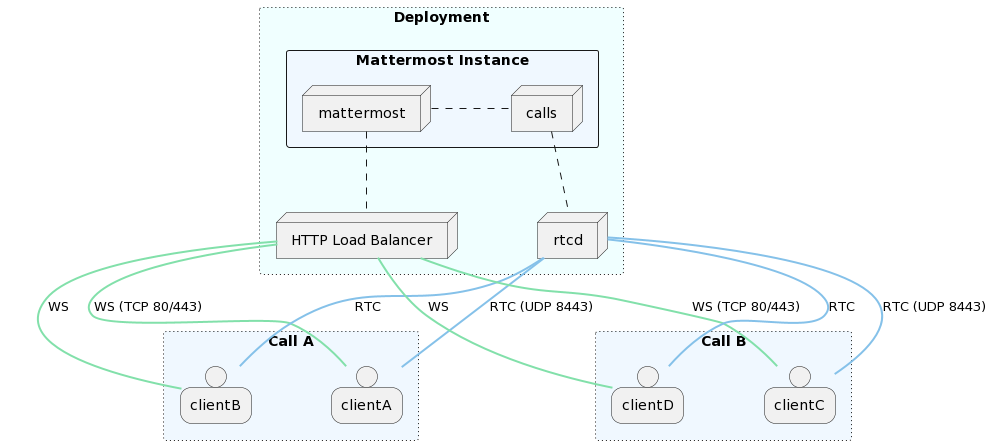
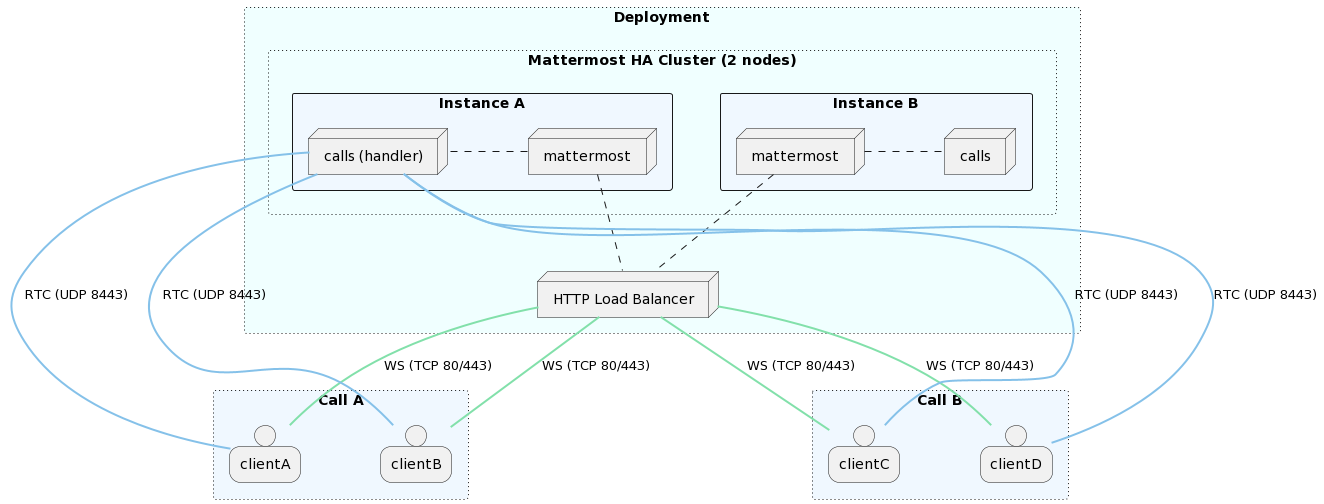
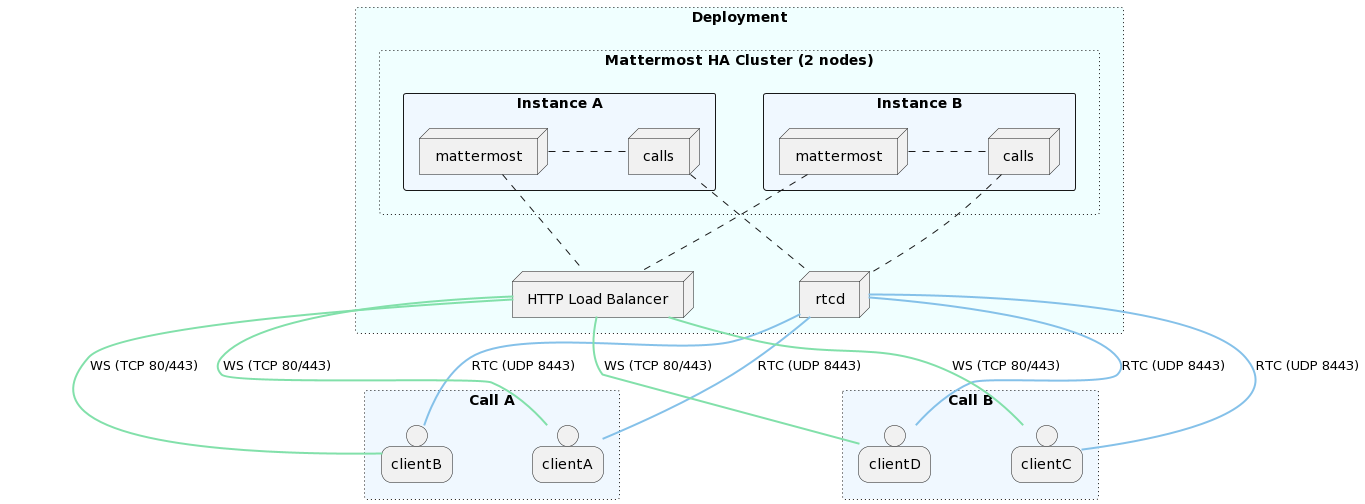
Depending on how the Mattermost server is running, there are several modes under which the Calls plugin can operate. Please refer to the section below on the RTCD service to learn about the rtcd and the Selective Forwarding Unit (SFU).
Mattermost deployment |
SFU |
SFU deployment |
|---|---|---|
Single instance |
integrated |
|
Single instance |
rtcd |
|
High availability cluster-based |
integrated |
clustered |
High availability cluster-based |
rtcd |
Single instance
Integrated
This is the default mode when first installing the plugin on a single Mattermost instance setup. The WebRTC service is integrated in the plugin itself and runs alongside the Mattermost server.
rtcd
Available on Enterprise and Enterprise Advanced plans
An external, dedicated and scalable WebRTC service (rtcd) is used to handle all calls media routing.
High availability cluster-based
Available on Enterprise and Enterprise Advanced plans
Clustered
This is the default mode when running the plugin in a high availability cluster-based deployment. Every Mattermost node will run an instance of the plugin that includes a WebRTC service. Calls are distributed across all available nodes through the existing load-balancer: a call is hosted on the instance where the initiating websocket connection (first client to join) is made. A single call will be hosted on a single cluster node.
rtcd (High Availability)
Kubernetes Deployments
Available on Enterprise and Enterprise Advanced plans
RTCD is the only officially supported approach for Kubernetes deployments. For detailed information on deploying Mattermost Calls in Kubernetes environments, including Helm chart configurations, resource requirements, and scaling considerations, see the Calls Deployment on Kubernetes guide.
When to Use RTCD
This section will help you understand when and why your organization would want to use the dedicated RTCD service.
Note
RTCD is a standalone service, which adds operational complexity, maintenance costs, and requires an Enterprise license. For those who are evaluating Calls, and for many small instances of Mattermost, the integrated SFU (the one included in the Calls plugin) may be sufficient initially.
The RTCD service is the recommended way to host Calls for the following reasons:
Performance of the main Mattermost server(s): When the Calls plugin runs the SFU, calls traffic is added to the processing load of the server running the rest of your Mattermost services. If Calls traffic spikes, it can negatively affect the responsiveness of these services. Using an RTCD service isolates the calls traffic processing to those RTCD instances, and also reduces costs by minimizing CPU usage spikes.
Performance, scalability, and stability of the Calls product: If Calls traffic spikes, or more overall capacity is needed, RTCD servers can be added to balance the load. As an added benefit, if the Mattermost traffic spikes, or if a Mattermost instance needs to be restarted, those people in a current call will not be affected - current calls won’t be dropped.
Some caveats apply here. While the main Mattermost server is down, things will quickly start to go awry: WebSocket events (for example: emoji reactions, hand raising, muting/unmuting) will not be transmitted, and new media track negotiations will fail. While existing media streams will continue initially, if the main server does not come back up within a reasonable timeframe (e.g., 1 minute), clients will begin to drop from the call entirely as their WebSocket re-connect attempts will hit the maximum allowed.
Kubernetes deployments: In a Kubernetes deployment, RTCD is strongly recommended; it is currently the only officially supported way to run Calls.
Technical benefits: The dedicated RTCD service has been optimized and tuned at the system/network level for real-time audio/video traffic, where latency is generally more important than throughput.
In general, RTCD is the preferred solution for a performant and scalable deployment. With RTCD, the Mattermost server will be minimally impacted when hosting a high number of calls.
For detailed RTCD setup instructions, see the RTCD Setup and Configuration guide.
Call Recording and Transcription
Available on Enterprise and Enterprise Advanced plans
Mattermost Calls supports recording, transcription, and live captioning features. These processes are resource-intensive and MUST be offloaded from the Mattermost application server to maintain performance.
For call recording and transcription, you need to:
Deploy the
calls-offloaderserviceConfigure the service URL in the System Console
Enable call recordings and/or transcriptions in the plugin settings
For detailed setup instructions, see the Calls Offloader Setup and Configuration guide.
Air-Gapped Deployments
Mattermost Calls can function in air-gapped environments. Exposing Calls to the public internet is only necessary when users need to connect from outside the local network, and no existing method supports that connection. In such setups:
Users should connect from within the private/local network. This can be done on-premises, through a VPN, or via virtual machines.
Configuring a STUN server is unnecessary, as all connections occur within the local network.
The ICE Host Override configuration setting can be optionally set with a local IP address (e.g., 192.168.1.45), depending on the specific network configuration and topology.
For call recording and transcription in air-gapped environments, see the Air-Gapped Deployments section in the Calls Offloader Setup documentation.
RHEL deployments with firewalld and fapolicyd
When deploying Mattermost Calls or the rtcd service on RHEL systems with firewalld or fapolicyd enabled, additional firewall and security configuration is required.
Required ports:
Calls plugin (integrated): Port 8443 UDP/TCP for RTC media traffic
rtcd service (standalone): Ports 8443 UDP/TCP for RTC media traffic + Port 8045 TCP for API communication with Mattermost
Configuration steps:
For complete firewalld and fapolicyd configuration instructions, including troubleshooting steps and example rules, see the RHEL deployment guide. The guide includes:
firewalld port configuration for Mattermost, Calls plugin, and rtcd service
fapolicyd rules for Mattermost server and Calls plugin
Separate fapolicyd configuration for standalone rtcd service
Troubleshooting guidance for “operation not permitted” errors
Note
The Calls plugin runs as part of Mattermost and is covered by the standard Mattermost fapolicyd rules. Only the standalone rtcd service requires separate fapolicyd configuration.
Performance Considerations
Calls performance primarily depends on:
CPU resources: More participants require more processing power
Network bandwidth: Both incoming and outgoing traffic increases with participant count. Due to the nature of the service, the bottleneck is always going to be the outgoing/egress path
Active speakers: Unmuted participants require significantly more resources
Presenters: Screen sharing participants require even more resources than active speakers
For detailed performance metrics, benchmarks, and monitoring guidance, see the Calls Metrics and Monitoring guide.
Frequently Asked Questions
Is calls traffic encrypted?
Media (audio/video) is encrypted using security standards as part of WebRTC. It’s mainly a combination of DTLS and SRTP. It’s not e2e encrypted in the sense that in the current design all media needs to go through Mattermost which acts as a media router and has complete access to it. Media is then encrypted back to the clients so it’s secured during transit. In short: only the participant clients and the Mattermost server have access to unencrypted call data.
Are there any third-party services involved?
Only a Mattermost STUN server (stun.global.calls.mattermost.com) is used by default. No user information, call metadata, or media traffic is ever sent to or shared with this STUN service; its sole purpose is to help WebRTC clients discover their public IP address and port mapping. Furthermore, this dependency can be entirely removed if you manually configure the ICE Host Override setting.
Is using UDP a requirement?
UDP is recommended protocol to serve real-time media as it allows for the lowest latency between peers, but TCP fallback is supported since plugin version 0.17 and RTCD version 0.11.
If clients are unable to connect using UDP (due to limitations or strict firewalls), you have a few options:
Since plugin version 0.17 and
rtcdversion 0.11 the RTC service will listen for TCP connections in addition to UDP ones. If configured correctly (e.g. using commonly allowed ports such as 80 or 443) it’s possible to have clients connect directly through TCP when unable to do it through the preferred UDP channel.Run calls through an external TURN server that listens on TCP and relays all media traffic between peers. However, this is a sub-optimal solution that should be avoided if possible as it will introduce extra latency along with added infrastructural cost.
Do I need a TURN server?
Only if clients are behind restrictive firewalls that block UDP. We recommend (and officially support) coturn if needed.
Can the traffic between Mattermost and rtcd be kept internal or should it be opened to the public?
Yes, the rtcd <-> Mattermost communication (HTTP/WebSocket API over TCP port 8045) should remain internal in almost all cases. When possible, it’s highly recommended to keep communication between the Mattermost cluster and the dedicated rtcd service under the same private network as this minimizes latency and greatly simplifies deployment and security. There is no requirement to expose rtcd’s HTTP API to the public internet. Only the media ports (UDP/TCP 8443) need to be accessible to end-users.
Can Calls be rolled out on a per-channel basis?
Yes. Mattermost system admins running self-hosted deployments can enable or disable call functionality per channel. Once test mode is enabled for Mattermost Calls:
Navigate to the channel where you want to enable or disable Calls
Access the channel menu by clicking the channel name at the top of the channel
Select the Calls option from the dropdown menu:
Select Enable calls for each channel where you want Calls enabled
Select Disable calls for all channels where you want Calls disabled
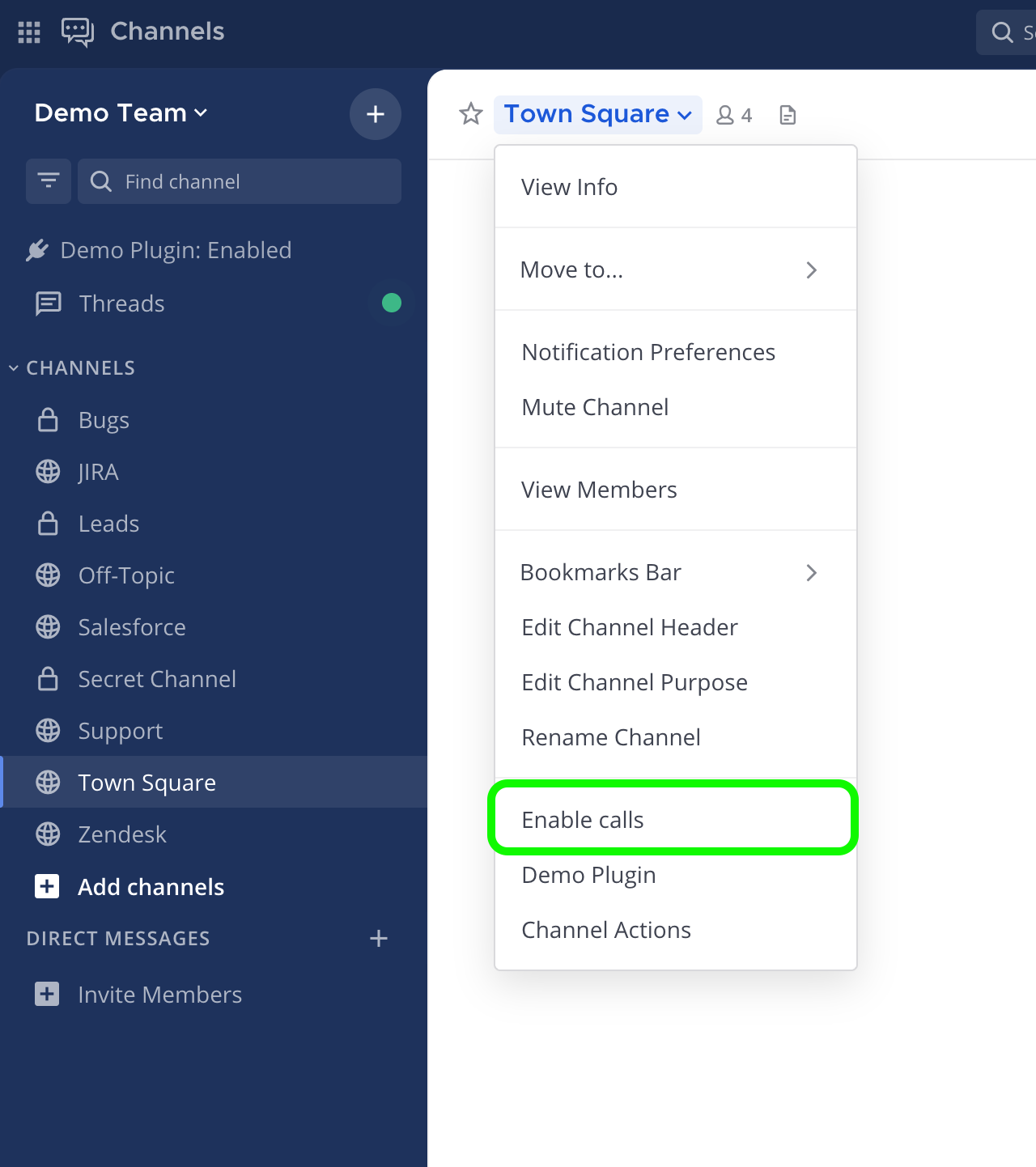
Once Calls is enabled for specific channels, users can start making calls in those channels.
Note
When test mode is disabled for Mattermost Calls, users in any Mattermost channel can make a call.
Troubleshooting
For comprehensive troubleshooting steps and debugging techniques, please refer to the Calls Troubleshooting guide.
Next Steps
For detailed setup instructions, see RTCD Setup and Configuration
For monitoring guidance, see Calls Metrics and Monitoring
If you encounter issues, see Calls Troubleshooting
For Kubernetes deployments, see Calls Deployment on Kubernetes