Channels Basics



Write messages
Write messages using the text input box at the bottom of the screen. Press ENTER to send a message. Use SHIFT+ENTER to create a new line without sending a message.
To send messages on CTRL+ENTER and use ENTER to insert new lines go to Main Menu > Account Settings > Advanced > Send messages on CTRL+ENTER.
 icon next to the message text.
Format your messages
Format your messages using Markdown that supports text styling, headings, links, emojis, code blocks, block quotes, tables, lists, and in-line images.
You can use either _ or * for italics and bold text.
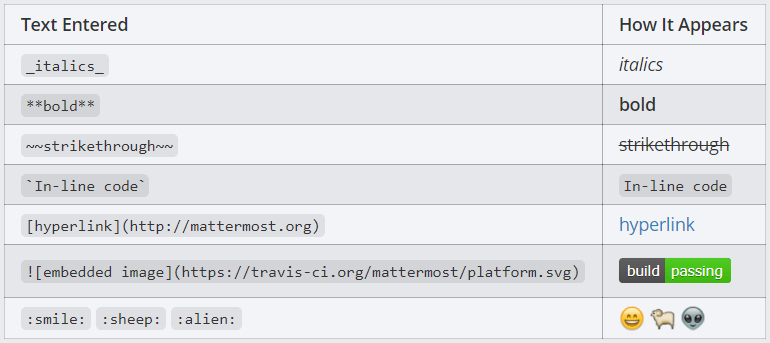
See our Formatting Text documentation for more details and examples.
React to messages
React to messages quickly by selecting the  icon inside the Mattermost message input box to open the Emoji Picker.
Or, react to messages by typing “:” followed by two characters, which will open an emoji autocomplete. If the existing emojis don’t cover what you want to express, you can also create your own Custom Emoji.
Share files
Share files by dragging and dropping them into Channels, or by selecting the  icon within the message input box.
 icon next to the message.