Generating a support packet
 Available on Enterprise and Professional plans
 Cloud and self-hosted deployments
Available in legacy Mattermost Enterprise Edition E10 and E20
Use the System Console to generate a Mattermost Support Packet that includes configuration information, logs, plugin details, and data on external dependencies. Confidential data, such as passwords, are automatically stripped.
Note
When present, the following information is santized during packet generation: LdapSettings.BindPassword, FileSettings.PublicLinkSalt, FileSettings.AmazonS3SecretAccessKey, EmailSettings.SMTPPassword, GitLabSettings.Secret, GoogleSettings.Secret, Office365Settings.Secret, OpenIdSettings.Secret, SqlSettings.DataSource, SqlSettings.AtRestEncryptKey, ElasticsearchSettings.Password, All SqlSettings.DataSourceReplicas, All SqlSettings.DataSourceSearchReplicas, MessageExportSettings.GlobalRelaySettings.SmtpPassword, ServiceSettings.GfycatApiSecret, and ServiceSettings.SplitKey.
To generate a Support Packet:
Go to the System Console, and select Commercial Support from the System Console menu.
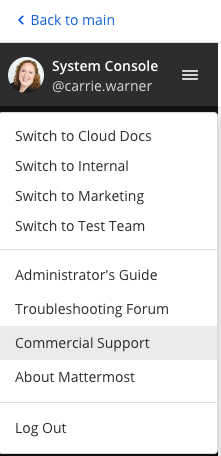
Select Download Support Packet. A zip file is downloaded to the local machine.
A Mattermost Support Packet can contain up to five files:
mattermost.logplugins.jsonsanitized_config.jsonsupport_packet.yamlcpu.profheap.profgoroutineswarning.txt(present when issues are encountered during packet generation)
You’ll be notified if any packet files are unavailable during packet generation. See the
warning.txtfile for details.Plugins are not sanitized during packet generation. Sanitize any confidential details in the
plugin.jsonfile before sending the Support Packet to Mattermost.
Note
When sanitizing Support Packet data, replace details with example strings that contain the same special characters if possible, as special characters are common causes of configuration errors.
LDAP groups are not included during Support Packet generation. Only LDAP Version and LDAP Vendor are included when present. These values are included in the support_packet.yaml file.
Go performance metrics
The Support Packet contains 3 go runtime profiling files:
cpu.profcontains a 5-second CPU profile
heap.profcontains a heap profile
goroutinescontains a dump of all the running go routines
These files can be read using pprof.
Use go tool pprof -web X to open a visualization of the profile in your browser, replacing X with the profile’s file name.