Archive and unarchive channels
 Available on all plans
 Cloud and self-hosted deployments
Archive a channel
Anyone can archive the public channels or private channels they belong to, unless the System Admin has restricted the permissions to do so. System Admins can archive channels in the System Console without needing to be a channel member. To archive a channel, select the channel name at the top of the center pane to access the drop-down menu, then select Archive Channel.
When a channel is archived, it’s removed from the user interface, but a copy exists on the server in case it’s needed for audit reasons at a later stage. From Mattermost v5.28, users can view, share, and search for archived channel content. Because a copy of the channel exists on the server, you can’t reuse the URL of an archived channel when creating a new channel.
Tip
Instead of archiving, you can also leave the channel open and post a message in the channel saying it’s considered archived, such as: # This channel is archived.
Unarchive a channel
System Admins and Team Admins can unarchive public channels or private channels they belonged to before they were archived. Search for the channel if required. Then, open the channel, select the channel name at the top of the center pane to access the drop-down menu and select Unarchive Channel.
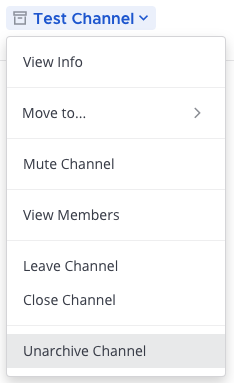
When a channel is unarchived, channel membership and all its content is restored, unless messages and files have been deleted based on the data retention policy.
Alternatively, System Admins can unarchive channels via the CLI, or via the mmctl. Team Admins can unarchive channels via the API.